
Mojave Valley Driving Controls
Start, shift, signal, and look around without stalling in a 25-player server.
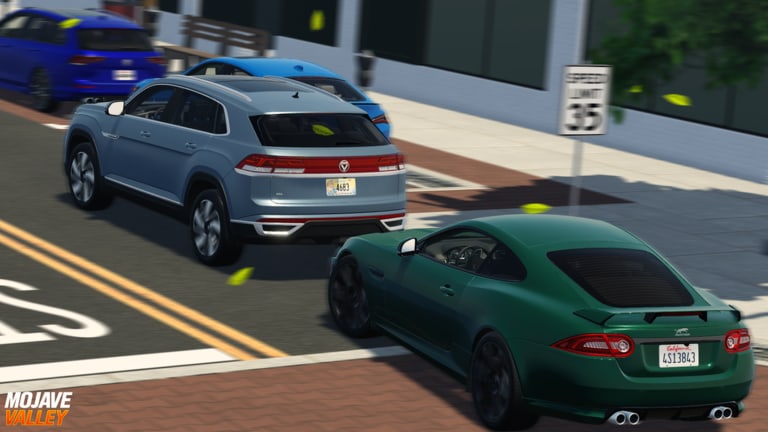
Mojave Valley is one of the few Roblox city games where the car is a machine, not a hover brick. If you skip this page you will sit in Park, honk, and assume the engine is broken. It is not. You have not started it.
Official console binds are printed in the Roblox description. PC and mobile binds come from in-game prompts and widely shared control videos. After you can start and shift, go back to the beginner guide or the money guide — Drive-to-Earn cares how smoothly you hold a speed, not how fast you can redline.
How to start the car
PC: hold S + F together. S is brake/reverse context; F is the ignition chord. Pressing F alone after the car is running often shuts it off. To restart, hold S+F again.
Console: hold LT + D-pad down. The description labels D-pad down as F, which is why the chord feels like the PC start.
Mobile: use the power button above the brake pedal. Gear buttons sit on the right; indicators, lights, and horn sit on the side clusters.
If nothing happens, you may be in Park with no keyfob equipped, or you are trying to start someone else’s locked car. Sit in the driver seat, wait a beat, then chord again. Houses and dealership lots are the worst places to learn this with traffic stacked behind you.
PC keybinds
| Action | Key |
|---|---|
| Start / restart | S + F |
| Shut off | F |
| Shift down / up | Q / E |
| Manual mode toggle | M |
| Turn signals | Z / C |
| Hazards | X |
| Horn | H |
| Low beam / high beam | L / J |
| First-person interior | B |
| Look around in first person | N |
| Car settings | G |
Manual mode is not a full clutch sim, but it is the difference between a car that crawls and a car that actually pulls. After you enter the seat you are often in Park. Tap E several times to move through the range into Drive. Downshift with Q before a 35 mph zone so you are not dragging sixth gear from a highway.
Car settings (G) is where people hide camera, steering, and assist toggles. If the wheel feels drunk after a patch, open G before you buy a new chassis from the car tier list.
Console binds (official)
| Action | Control |
|---|---|
| Start car | LT + D-pad down |
| Shift down | Button X |
| Shift up | Button Y |
| Turn signals | D-pad left / right |
| Hazards | Button B |
Console players still need the Shop menu for codes and jobs. Driving binds will not open those tabs. Use the on-screen cursor or the standard Roblox gamepad menu toggle.
Mobile
Mobile is supported — official update titles have called it out — but the HUD is busy. Power above the brake is easy to miss. Gear shifting is on the right. Indicators, lights, and horn are side buttons. If you plan to main mobile, practice in a quiet neighborhood from the map guide before you attempt a highway grind next to a CLA 45.
First person and keyfobs
A lot of players zoom the camera and think that is interior view. It is not. Press B for first person inside the cabin, then N to look around. This matters for RP (checking blind spots, showing an interior at a house meetup) and for spotting speed-limit signs that Drive-to-Earn cares about.
Keyfob videos for this game walk lock, lights, and remote start style interactions on specific trims. Not every cheap hatch has the same toy features as a show-car Mazda 3 with a working hood. Buy utility first, gizmos later.
Driving manners that affect money
Drive-to-Earn is not “go as fast as physics allow.” Community tests and the money guide agree: stay about 5–10 mph above the posted limit on streets, and around legal highway speeds for the bigger ticks. A 35 mph sign with a Jaguar stacked behind a Tucson is a good reminder — see the in-game street shots on this wiki — that downtown is not a drag strip.
Signals (Z/C or D-pad) and hazards (X or B) are how you survive a 25-player server without becoming the clip in someone’s Discord. Police RP with the Public Services pass notices people who treat the map like a free-roam chaos game. Read players if you want to stay on the civilian side of that.
Troubleshooting
Car will not start. You are not holding S+F (or LT + D-pad down) together. Or you are in a passenger seat.
Car starts then dies. You tapped F. Chord S+F to restart.
No acceleration. Still in Park. Shift up with E or Y.
Engine scream, no speed. Wrong gear. Downshift before corners, upshift on highways.
Cannot see dashboard. Press B, then N.
Once the muscle memory is there, go take a Cafe Job and actually earn. Controls are the gate; they are not the game. The guides hub sends you to money, map, and houses next.
Frequently Asked Questions
Quick answers for Mojave Valley on Roblox.
How do I start a car in Mojave Valley?
On PC hold S and F together. On console hold LT and D-pad down. On mobile tap the power button above the brake.
How do I shift gears?
PC uses Q to downshift and E to upshift, with M for manual mode. Console uses Button X down and Button Y up. You often start in Park.
How do I go first person in the car?
Press B for interior view and N to look around. Zooming the third-person camera is not the same thing.
Where are turn signals?
PC: Z and C, with X for hazards. Console: D-pad left and right, with Button B for hazards.